The Best MCP for Meetings
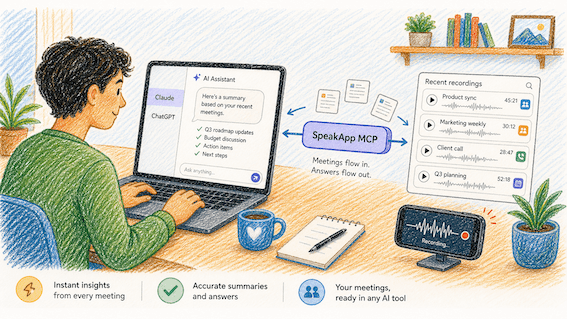
If you work in meetings, you already know the loop. Call ends. A week later someone asks "didn't we decide on the new pricing in that call with Sarah?". If you have meeting transcripts you spend twenty minutes scrolling and ctrl-Fing through transcripts trying to find one sentence. If you don't have meeting transcripts, then you really don't know. Both scenarios are very far from how it should be.
The Model Context Protocol (MCP) is finally fixing this. MCP lets you plug your real tools (calendars, docs, ticketing systems) directly into Claude, ChatGPT, Cursor, and other AI clients. The model now has the data when you ask.
But not every MCP server is created equal, and there are a few meeting-related MCPs that really work. Here is a comparison of what's worth connecting if your day revolves around calls.
What an MCP for meetings actually needs to do
Before we get to the comparison, it's worth being precise about the job. A good meetings MCP should let your AI assistant do at least these four things on demand:
List what you've recorded recently. You can ask "what did I talk about this week?" and get a real answer.
Pull a specific transcript by reference. For example by title, date, folder, or topic.
Handle long transcripts gracefully. A 90-minute meeting is a lot of tokens. Streaming or chunking matters.
Stay out of the way. No auth pop-ups every five minutes, no "I can't access that file."
Most MCPs in this space nail one or two of these. A few nail three. Very few nail all four.
MCP for meetings ranking:
1. SpeakApp MCP
URL: speakapp.com/mcp Best for: anyone whose meetings, lectures, voice notes, or interviews already live in SpeakApp. This is, full disclosure, ours. We built it because our users kept asking the same thing: "I have many recordings. Can Claude/ChatGPT just read them?" Now it can.
The server exposes two tools, intentionally minimal:
list_recordings— paginated metadata for everything you've ever recorded. Title, date, weekday, duration, language, status. Sorted newest-first. You can walk through multiple meetings in a single request without burning through context.get_recording— fetch the full transcript by ID, with built-in offset and length parameters so even a multi-hour board meeting can be streamed in chunks instead of dumped into the model all at once.
Why this matters in practice: when you say "summarize my Tuesday call about the pricing change," Claude calls list_recordings, finds the Tuesday entry by title and weekday, then calls get_recording for that specific UUID. You don't see any of this. You just get the answer. The same pattern works for "compare what the candidate said in last week's interview with the one from yesterday" or "draft a follow-up email to everything I discussed with Sarah this month."
Strengths:
Works across iOS, macOS, Android, Windows and the web app. Wherever you record, it's all in one library.
Speaker diarization is preserved in the transcript, so the model knows who said what.
Multilingual out of the box (we serve users in 100+ languages).
The pagination and offset pattern is the most token-efficient design we've seen for this category. Important if you have hundreds of recordings.
GDPR-compliant. Your transcripts are not training data for anyone.
Limitations:
You need to be a SpeakApp user. If your meetings live somewhere else, this isn't the right tool.
No write operations yet. You can read transcripts, you can't (yet) trigger a recording or edit one from the model.
2. Granola MCP
Best for: Mac users who already live inside Granola for note-taking.
Granola has a vocal fanbase among Mac power users, and several community-built MCP wrappers exist on GitHub. The fundamental design is similar to ours: list notes, fetch notes, but the official integration story is still evolving and depends on which community server you pick. Mac-only is a real limitation if your team uses iPhones or Android, and there's no first-party server you can connect with one click yet.
3. Otter MCP (limited / via Zapier)
Best for: teams already paying for Otter Business and willing to route through Zapier MCP.
Otter doesn't ship a native MCP server at the time of writing. You can hack something together via Zapier's MCP, but you're paying twice (Otter + Zapier), and Zapier's tool surface is generic. Your AI gets "create a row" verbs, not "give me the transcript of the call I had with Sarah." Workable for one-off automations, painful for daily use.
4. Fireflies / Fathom / Read.ai
Best for: teams who care most about meeting bot coverage, less about post-hoc AI workflows.
These are excellent meeting recorders. The MCP story is currently weak across the board. Most rely on third-party bridges, and the available tools tend to be optimized for "create a calendar event" rather than "let me think about my transcripts." Watch this space; it'll likely improve in 2026.
5. Direct Google Drive / Notion MCP
Best for: teams whose meeting notes are already manually saved as docs.
This is the duct-tape approach: record somewhere, paste the transcript into Notion or Google Docs, then connect those MCPs. It works, but you've now added a manual step between every meeting and every AI workflow, which defeats the point.
Why we think SpeakApp comes out ahead (for this specific job)
It's the only category-native MCP that's already capturing your meetings, on every platform, and serving them back to your AI assistant in a model-friendly shape. The pagination pattern means Claude can scan 1,000+ recordings without breaking a sweat. The offset/maxLength pattern on get_recording means a 4-hour conference talk fits into your workflow without hitting context limits. The two-tool surface means there's nothing to learn. Claude figures out the right calls on its own.
If your meetings already live in SpeakApp, plugging this in takes about 30 seconds. If they don't yet, it might be worth trying SpeakApp specifically for this workflow.
What this looks like in real life
A few of the prompts our team actually uses, day to day:
"What were the three biggest concerns the client raised in yesterday's meeting?"
Claude calls list_recordings, identifies yesterday's meetings by title, fetches the transcript, and gives you a real answer in about ten seconds.
"Across all my customer calls this month, what features got mentioned most?"
Claude paginates through the month, pulls the relevant transcripts, and gives you a synthesized answer.
"Draft a follow-up to Sarah summarizing what we agreed in our last two calls."
Claude finds both calls, reads them, and writes the email. You edit the tone and send.
"I'm preparing for a meeting with the design team. What did we last decide about the typography system?"
Claude finds the relevant past meeting (even one from weeks ago) and brings you up to speed in a paragraph.
None of these prompts mention transcript IDs, dates, or filenames. You just talk normally. The model figures the rest out because the MCP gives it the right primitives.
How to set it up
Whether you're on Claude Desktop, Claude.ai, ChatGPT, Cursor, or Codex, the connection process is the same. You can find the details on the SpeakApp MCP page:
Open your client's MCP / Connectors settings.
Add a new server with the URL
https://mcp.speakapp.com/mcp.Authenticate with your SpeakApp account.
Done. Ask Claude "what did I talk about this week?" and watch it work.
Detailed setup guides for each client are in our docs.
The bigger picture
MCP is going to be one of those infrastructure shifts that feels invisible once it lands. In a year, the question won't be "which AI assistant is smartest?". It'll be "which assistant has access to my actual stuff?" Meetings are some of the most valuable, hardest-to-search content most knowledge workers produce, and until recently, none of it was reachable by AI without a lot of manual lifting.